Running Your Own Custom Authoritative DNS Server
This is all very experimental. I deployed it for my domain, vimarsh.cc. So when you open this website, your computer first asks “where is vimarsh.cc?”. The server that gives the final answer is not Cloudflare or my domain registrar. It is a small Go program that I wrote, running on my own server.
Why?
I wanted to learn Go. Go is such a simple and nice language, and I really enjoy writing it.
I also use DNS every day. I even ran a public DNS resolver some time back. But I did not really know what happens inside a DNS server. So I made one rule for myself: no DNS libraries. I read the packets myself and I write the answers myself. (The only outside package is for the password on the admin page.)
And yes, it is also just for fun. Only I use it. If it breaks, only my website breaks. Fine.
First, what is DNS?
Computers talk to each other with IP addresses, like 1.2.3.4. People remember names, like vimarsh.cc. DNS is the phone book that connects the name to the address.
There are two kinds of DNS servers:
- Resolver: it does the asking for you. Your ISP has one.
1.1.1.1(Cloudflare) and8.8.8.8(Google) are also resolvers. A resolver keeps answers for some time, so it does not ask again every time. - Authoritative server: it has the real answer for a domain. It does not ask anyone else. It only says “for this name, the IP is this”.
My older post was about a resolver. This post is about an authoritative server.
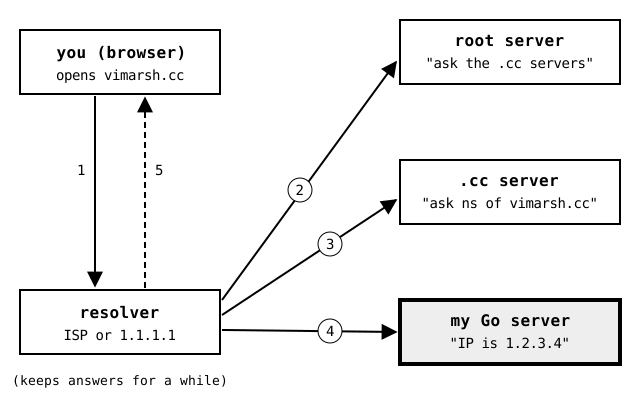
This is what happens when you open vimarsh.cc:
- Your browser asks the resolver: “where is vimarsh.cc?”
- The resolver asks a root server. The root server does not know. It says “ask the .cc servers”.
- The resolver asks the .cc server. It also does not know. It says “ask the nameserver of vimarsh.cc”. That nameserver is my server.
- The resolver asks my Go server. My server gives the IP address.
- The resolver gives the IP address to your browser. Now the browser can load the page.
Step 4 is the part I wrote. Everything else is the normal internet.
How does the .cc server know about my server? At my domain registrar (the website where I bought the domain), I changed the nameserver setting to point to my server.
What the server does
The whole thing is one Go program. It does three jobs at the same time:
- It answers DNS questions over UDP.
- It listens on TCP for zone transfers. (A zone transfer copies all records to a second nameserver. More on this below.)
- It shows a small web page where I can add and delete records.
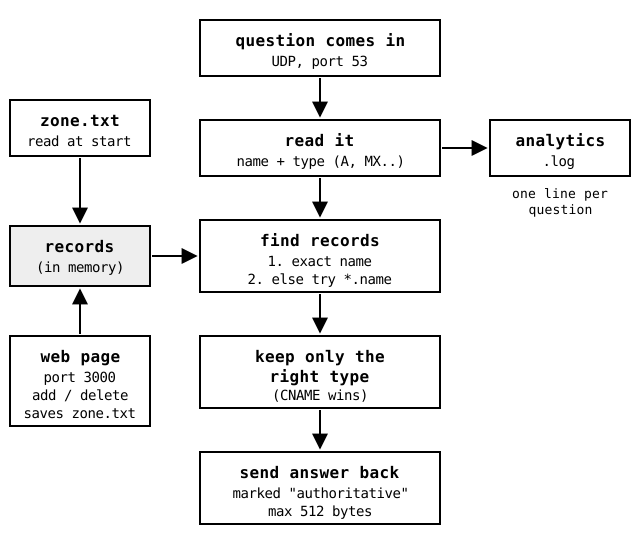
For one question, these are the steps:
- A question comes in. It is one small UDP packet. (UDP is simple: you send one packet and you get one packet back. There is no connection setup.)
- Read it. The server reads the name and the type. The type tells what you want:
A: the IPv4 address (like1.2.3.4)AAAA: the IPv6 addressCNAME: “this name is another name, go ask for that one”MX: the mail server for the domainTXT: any text. Mostly used to prove you own a domain (Google, email checks, etc.)NS: the nameserver for the domain
- Find the records. First the server looks for the exact name. If there is no match, it tries a wildcard. For example, for
blog.dev.vimarsh.ccit also tries*.dev.vimarsh.cc. - Keep only the right type. If you ask for
A, you get onlyArecords. There is one special rule: if the name has aCNAME, the server sends only theCNAME. The resolver then follows it by itself. - Send the answer back. The server marks the answer as “authoritative”. This tells the resolver “this is the real answer, not a copy”.
Each question also becomes one line in analytics.log. More on that below.
Reading the packet
This was the most fun part. A DNS packet is just a list of bytes.
The first 12 bytes are the header. It has an ID, some flags, and four numbers that say how many questions and answers are in the packet. In Go, I can read these 12 bytes straight into a struct:
type dns_header struct {
    Id      uint16 // same ID goes back in the answer
    Flags   uint16 // answer? authoritative?
    Qdcount uint16 // number of questions
    Ancount uint16 // number of answers
    Nscount uint16
    Arcount uint16
}

// fill the whole struct in one line:
binary.Read(buf, binary.BigEndian, &hdr)
One line to fill the whole header. I really liked that about Go.
After the header comes the name. But the name is not written with dots. Each part of the name starts with its length, and a 0 marks the end:
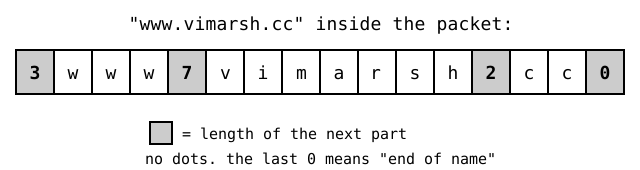
So reading a name is a small loop (simple version of the code in packet.go):
for {
    length, _ := r.ReadByte() // length of the next part
    if length == 0 {
        break // 0 means end of the name
    }
    part := make([]byte, length)
    r.Read(part)
    labels = append(labels, string(part))
}
name := strings.Join(labels, ".") // "www.vimarsh.cc"
To answer, the server does the same thing in reverse. It copies the ID from the question, so the resolver knows which question this answer is for. It sets two flags: “this is an answer” and “I am authoritative”. Then it writes the records after the question.
The zone file
All records are in one plain text file, zone.txt. One record on each line:
# name             TYPE   value                          TTL
example.com.       SOA    ns1.example.com. admin.example.com. 2025071801 3600 600 604800 300 3600
example.com.       NS     ns1.example.com.               3600
example.com.       A      192.0.2.10                     300
www.example.com.   CNAME  example.com.                   300
*.dev.example.com. A      192.0.2.20                     300
example.com.       TXT    "hello from my own dns server" 300
example.com.       MX     "10 mail.example.com."         3600
Some notes on this file:
- TTL means “time to live”. It is the number of seconds a resolver can keep the answer before it asks again.
- The dot at the end of a name (
example.com.) means “this is the full name”. It is how DNS writes names. - MX has two parts: a priority number and the mail server. Put them in quotes, so the server reads them as one value.
- SOA means “start of authority”. It is the main info about the domain: the main nameserver, the admin email (with a
.in place of the@), and a serial number. When the records change, the serial number goes up. Second nameservers use this number to know when to copy the records again.
When the server starts, it reads this file into a Go map: name to list of records. So each question is just one map lookup. No database.
Running it
1. Start the server
git clone https://github.com/vimarsh244/dns
cd dns && sudo go run .
You need sudo only for port 53. By default, the port is 8053, for testing. You can change it in main.go (var port int16 = 8053). For a real domain, set it to 53. Resolvers always ask on port 53.
2. Test it with dig
dig @127.0.0.1 -p 8053 example.com A
The answer looks like this:
;; flags: qr aa; QUERY: 1, ANSWER: 1, AUTHORITY: 0, ADDITIONAL: 0

;; ANSWER SECTION:
example.com.		300	IN	A	192.0.2.10
qr means “this is an answer”. aa means “authoritative answer”. That is my server saying “trust me, this is the real one”.
The wildcard also works. Any name under dev.example.com gets the same IP:
dig @127.0.0.1 -p 8053 anything.dev.example.com A +short
192.0.2.20
3. Open the admin page
First, make a password. This saves a hashed (scrambled) copy of the password, not the password itself:
go run helper/pass.go yourpassword > admin.pass
Then restart the server and open http://localhost:3000. The user name is admin. On this page you can add and delete records. Each change is saved to zone.txt right away.
4. Use it for a real domain
- Run it on a server with a public IP address.
- Open port 53 for UDP and TCP in the firewall.
- At your domain registrar, set the nameservers of your domain to your server.
p.s. Most registrars ask for at least two nameservers. And if one server is down, your whole domain is down. Keep this in mind.
Analytics
I wanted to know how many people (or bots) ask for my domains. So each question is written to analytics.log as one line of JSON:
{"type":"request","name":"www.vimarsh.cc CNAME IN","timestamp":"2025-07-18T07:48:26.359834317Z"}
There are three types: request (every question), notfound (no record for that name), and error (bad packet). When I open the admin page, the server reads the whole file and counts the lines for the last 24 hours, 7 days and 30 days.
This is very simple, and it will get slow when the file gets a few MB. But it works for now.
Zone transfer (AXFR)
A zone transfer is how a second nameserver copies all records from the first one. The second server connects over TCP and asks for everything. My server sends the SOA record, then all the records, then the SOA record again to mark the end.
This part mostly works. But there is supposed to be a check before sending: both servers share a secret key, and each message is signed with it (this is called TSIG). That check does not work yet. For now, only IP addresses on an allow list (in main.go) can ask for a transfer.
What does not work (yet)
- Answer size: over UDP, one answer can be at most 512 bytes. Very long
TXTrecords will get cut. Normal questions over TCP are not done yet. TCP is only for zone transfers. - Wildcards: they work, but the code is patch upon patch. It is not a good way to do it, but only I use it, so it is fine?
- Names that do not exist: the server sends an empty answer. A proper server sends a clear “this name does not exist” reply (called
NXDOMAIN). - More record types: no
PTRandSRVrecords. I will most likely not add them.TXTrecords are enough for most domain checks now. - Analytics: the log file only grows. It is never cleaned up.
Conclusion
Overall I am pretty happy with it. At its core, DNS is old and simple: small packets, names written as length plus letters, and a few flags. The hard part is all the special cases: CNAME rules, wildcards, size limits, zone transfers. I found each of these one by one, as I read the RFCs (the documents that define how DNS works). That is why the code is patch upon patch.
I would not run a business domain on this. For that, just use Cloudflare or the DNS of your registrar. But if you want to really understand DNS, writing a small server yourself is the best way I found. It is about 1,600 lines of Go, and you can read all of it in one evening.
Next, I want to add TCP for normal questions, a proper “does not exist” reply, and the TSIG key check.
p.s. I was too lazy to write this blog post. So Claude did heavy changes to my draft and finished the writing.